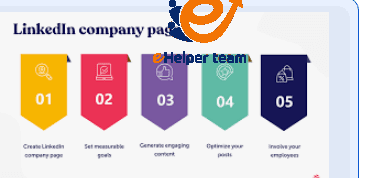
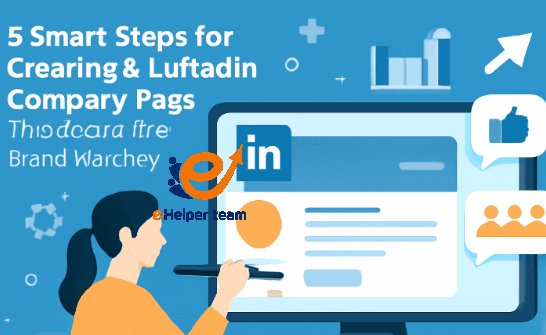
5 Steps for creating a LinkedIn company page
In today’s digital business landscape, creating a LinkedIn company page is more than just setting up a profile — it’s a strategic step toward building your brand’s authority and visibility in the professional world. With over 900 million users worldwide, LinkedIn has evolved into a powerful platform for companies to connect with clients, attract top talent, and establish industry leadership.
According to recent marketing insights, businesses with active LinkedIn pages generate twice as many leads as those without. Your company’s presence on LinkedIn helps shape how potential partners and customers perceive your expertise and trustworthiness.
For a step-by-step guide, you can explore this detailed resource on how to structure and launch your first company page effectively.
Now, let’s explore the five smart steps that can turn your company page into a professional magnet for growth and networking.

5 Steps for creating a LinkedIn company page
Step 1 – Define Your Brand Identity Before You Start
Before creating a LinkedIn company page, your first task is to define your company’s identity. This includes clarifying your mission, vision, tone of voice, and visual style.
Ask yourself these key questions:
What message do we want to communicate to our audience?
Who are our target clients or professionals?
How do we differentiate ourselves from competitors?
A well-defined brand identity helps your LinkedIn content resonate with the right people. For example, if your brand focuses on digital marketing, your company page should consistently reflect that expertise through both visuals and language.
For a deeper understanding of branding and online positioning, check out this article about tools of online marketing — it explores essential platforms that can elevate your company’s digital reputation.
Pro Tip:
Ensure your logo, banner, and company description reflect a consistent brand tone. LinkedIn users often judge credibility based on visual coherence, so design plays a key psychological role in engagement.
Step 2 – Optimize Your Company Profile for Search and Engagement
Optimization is where many businesses fail — but it’s also where you can stand out. When creating a LinkedIn company page, pay close attention to keywords, visuals, and formatting. LinkedIn’s algorithm favors pages that are complete and keyword-rich.
Key elements to optimize:
Company Description – Use your main keyword naturally and include relevant terms like “digital marketing,” “business solutions,” or “career growth.”
Website Link & Contact Info – Ensure they are accurate and visible.
Hashtags – Use three industry-related hashtags to increase discoverability.
Banner and Logo – Maintain clarity and brand color consistency.
Optimizing for search isn’t limited to LinkedIn. You can learn more about improving visibility through SEO basics for beginners, which outlines fundamental ranking strategies for any digital platform.
Why Optimization Matters
When users search for companies, LinkedIn’s search algorithm prioritizes profiles with complete and relevant information. A fully optimized company page increases your chances of appearing in searches by 70%, according to LinkedIn’s latest business data.
Step 3 – Create and Share Engaging Content Consistently
Once your foundation is set, your next goal in creating a LinkedIn company page is maintaining consistent, high-quality content. Consistency tells your audience that your brand is active and credible.
Types of content that perform well:
Industry insights and professional tips
Short videos or infographics that showcase your products or expertise
Employee highlights and behind-the-scenes stories
Thought leadership posts addressing current trends
By sharing educational and inspiring posts, you’ll attract followers organically and boost engagement. According to LinkedIn’s algorithm, consistent posting (2–3 times per week) increases visibility dramatically.
Also, use LinkedIn Analytics to monitor what content performs best — then adapt your strategy accordingly.
Remember: Great content is not about volume; it’s about value and relevance.
Step 4 – Encourage Employee Advocacy and Collaboration
Your employees are your most powerful brand ambassadors. Encourage them to connect their profiles to your page, engage with company posts, and share updates.
Employee engagement helps humanize your company and expand its reach exponentially. A single employee share can reach hundreds of additional professionals who may not have known about your brand otherwise.
Strategies for employee engagement:
Host internal workshops to show employees how to share content effectively.
Recognize active contributors to encourage participation.
Include “Employee of the Month” features to foster company pride.
Incorporating employee advocacy not only increases brand visibility but also improves trust and authenticity among your audience.
Step 5 – Measure, Analyze, and Improve Your LinkedIn Performance
The final and most critical step in creating a LinkedIn company page is ongoing analysis. Launching your page is only the beginning — the real growth happens when you measure results and continuously refine your strategy.
Use LinkedIn Analytics to Track Performance
LinkedIn offers a built-in analytics dashboard that provides key insights into:
Visitor demographics (job titles, industries, locations)
Post engagement (likes, shares, comments, impressions)
Follower growth over time
Click-through rates (CTR) from content links
These metrics help you understand what resonates with your audience. If your videos generate higher engagement than static posts, shift your strategy accordingly.
- Benchmark and Compare
To stay competitive, compare your metrics against similar brands in your niche. Consistent tracking helps you refine your tone, visuals, and posting frequency for better impact.
For a broader digital marketing perspective, explore this guide on SEO basics for beginners, which discusses performance metrics that align perfectly with LinkedIn’s analytics approach.
- Key Takeaway
Analytics aren’t just numbers — they’re a story of how well your audience connects with your brand. Companies that regularly adjust their content strategy based on data insights tend to see 30–40% higher engagement rates.
Advanced Tips to Maximize ROI from Your LinkedIn Company Page
Creating a strong LinkedIn presence is not a one-time setup. To maximize return on investment (ROI), you need an ongoing strategy built on consistency and innovation.
1. Leverage LinkedIn Ads Strategically
Paid campaigns can help boost visibility for product launches, job openings, or webinars. Use LinkedIn Sponsored Content to target audiences by profession, location, or industry.
2. Engage with Your Audience
Respond to comments, thank followers for feedback, and join relevant discussions in your industry. LinkedIn rewards active community participation by improving organic reach.
3. Update Your Page Regularly
Outdated company pages can harm credibility. Refresh your visuals, description, and hashtags every few months to reflect your latest services or achievements.
4. Integrate with Other Platforms
Connect your LinkedIn page with your company website and other social channels. Embedding your LinkedIn feed into your website helps increase both traffic and trust.
For practical tools that simplify this process, check this article about tools of online marketing, which highlights software and platforms that streamline multi-channel branding.
5. Build Thought Leadership
Encourage your leadership team to post insights under the company page. This enhances your organization’s authority and gives your audience a sense of connection with real experts behind the brand.
How to Turn a LinkedIn Company Page into a Growth Engine
Once you master creating a LinkedIn company page, the next step is transforming it into a long-term business growth engine. Here’s how to make that happen:
Use Visual Storytelling: Showcase customer success stories or short clips that reflect your culture and expertise.
Launch Monthly Campaigns: Dedicate each month to a specific theme (e.g., “Innovation Month” or “Employee Voices”).
Feature Clients and Partners: Tag collaborators in posts — it increases mutual visibility and engagement.
Encourage Reviews: Invite followers to endorse your products or services in the comment section.
By implementing these methods, you transform your company page from a static profile into a dynamic communication hub that drives awareness, conversions, and community building.
Common Mistakes to Avoid When Creating a LinkedIn Company Page
Even experienced marketers can make errors when setting up a company page. Here are some pitfalls to avoid:
Incomplete Profile: Missing contact info or banners harms credibility.
Inconsistent Branding: Different tones or unaligned visuals confuse visitors.
Irregular Posting: Posting once a month isn’t enough to maintain visibility.
Neglecting Analytics: Without data tracking, your efforts may go unnoticed.
Over-Promotion: Focus on value, not just selling.
Each of these mistakes can weaken your professional reputation. Treat your LinkedIn company page as a living portfolio that evolves with your business.
Frequently Asked Questions (FAQs)
1. Why should my business have a LinkedIn company page?
A LinkedIn company page builds brand credibility, helps with recruitment, and attracts clients looking for trusted partners. It’s an essential part of your digital presence.
2. Is creating a LinkedIn company page free?
Yes, creating a LinkedIn company page is completely free. However, you can enhance visibility through paid LinkedIn Ads if needed.
3. How long does it take to see results after launching a page?
Most businesses start seeing engagement growth within 4–8 weeks of consistent posting and audience interaction.
4. Can small businesses benefit from LinkedIn pages?
Absolutely. LinkedIn isn’t only for large corporations — small and medium-sized businesses use it effectively for B2B networking and client acquisition.
5. What content works best on a LinkedIn company page?
Educational posts, industry insights, employee highlights, and storytelling content tend to perform best for engagement.
6. How often should I post on my company page?
Experts recommend posting 2–3 times a week for optimal reach and audience retention.
7. How can I improve engagement on my LinkedIn posts?
Engage with followers, use relevant hashtags, add visuals, and post during peak business hours (usually Tuesday to Thursday mornings).
8. What are the best metrics to track performance?
Focus on engagement rate, follower growth, impressions, and click-through rate to measure success.
9. Should employees link their profiles to the company page?
Yes — it boosts credibility and extends your brand’s reach through employee advocacy.
10. How can I promote my LinkedIn page outside the platform?
Include your LinkedIn page link on your website, email signatures, and other social media bios to drive external traffic.
Conclusion
Building a professional image on LinkedIn requires dedication, authenticity, and continuous optimization. By following these 5 steps for creating a LinkedIn company page, you’ll craft a strong foundation that supports your business growth, enhances brand trust, and connects you with a global professional network.
With LinkedIn’s expanding features and analytics tools, there’s never been a better time to establish your company’s digital footprint. Start today, monitor your progress, and let your page speak for your brand’s excellence.


